


End-to-End Testing: Understanding the Full User Journey
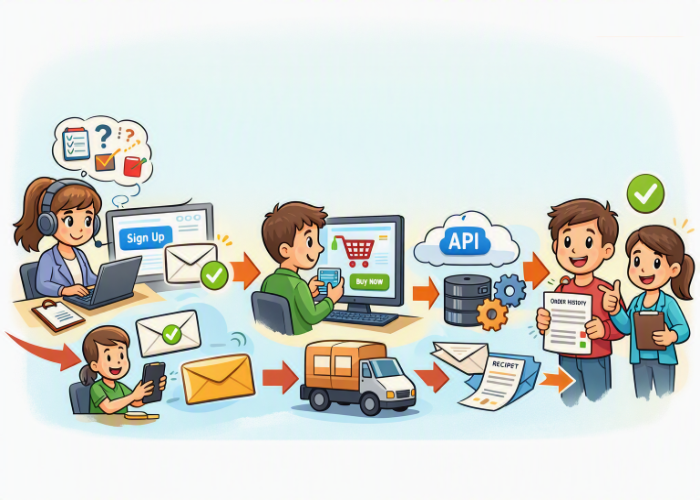
When people talk about software testing, they often think about checking individual features: clicking a button, submitting a form, or verifying a calculation. But real users don’t interact with your application in isolated pieces — they follow a journey. They log in, search, navigate, purchase, download, and interact with multiple systems along the way.
End-to-end (E2E) testing is the practice of validating that entire journey from start to finish. It ensures that every step works together exactly as a user expects.
This guide breaks down E2E testing in a simple, beginner-friendly way so you can understand what it is, why it matters, and how to start practicing it as a QA tester.
⭐ What Is End-to-End Testing?
End-to-end testing is a holistic testing approach where you validate the complete flow of an application — including its integrations, data layers, and external dependencies.
Instead of testing one feature at a time, you test how everything works together.
Think of it like walking through the entire house instead of checking one room at a time. You’re making sure:
- the front door opens
- the lights turn on
- the water runs
- the appliances work
- and nothing breaks when you move from one room to another
In software terms, an E2E test might look like:
- A user signs up
- Receives a confirmation email
- Logs in
- Updates their profile
- Makes a purchase
- Receives a receipt
- Sees the correct order history
If any step fails, the user’s journey breaks — and that’s exactly what E2E testing helps prevent.
⭐ Why End-to-End Testing Matters
1. It reflects real user behavior
Unit tests and integration tests are important, but they don’t always catch issues that happen when multiple systems interact. E2E tests simulate how users actually use your product.
2. It validates critical business flows
Checkout processes, onboarding, account creation, and payment flows must work flawlessly. E2E tests ensure these high-value paths are stable.
3. It catches integration issues early
Modern applications rely on APIs, databases, third-party services, and microservices. E2E testing helps identify problems that only appear when these systems communicate.
4. It builds confidence before releases
Teams often run E2E tests as part of release pipelines to ensure nothing major breaks before deployment.
⭐ What Does an End-to-End Test Include?
E2E tests typically cover:
- UI interactions (clicking, typing, navigating)
- Backend validation (database updates, API responses)
- Third-party integrations (payment gateways, email services)
- Cross-browser or cross-device behavior
- Data flow from start to finish
- Error handling and edge cases
A good E2E test doesn’t just check that something works — it checks that everything works together.
⭐ Example: A Simple E2E Test Scenario
Let’s walk through a beginner-friendly example.
Scenario: User creates an account and logs in
Steps:
- Navigate to the website
- Click “Sign Up”
- Enter name, email, password
- Submit the form
- Receive a confirmation message
- Log in using the new credentials
- Verify the dashboard loads correctly
What you’re validating:
- UI elements behave correctly
- Form validation works
- Backend creates the user
- Email or confirmation logic triggers
- Login authentication works
- Dashboard loads with correct user data
This is a full user journey — not just a single feature.
End-to-End User Journey Flow
[User Action]
     ↓
[Frontend UI]
     ↓
[Backend Services]
     ↓
[Database / Data Layer]
     ↓
[Third-Party Integrations]
     ↓
[System Response Back to User]
Explanation
This simple flow shows how a user’s action travels through multiple layers of an application. An E2E test follows this entire path — from the moment a user clicks a button to the moment the system responds — ensuring every layer works together without breaking.
⭐ Manual vs. Automated End-to-End Testing
Manual E2E Testing
Great for:
- exploratory testing
- new features
- complex flows that require human judgment
- usability checks
Manual E2E testing helps you understand the product deeply and think like a user.
Automated E2E Testing
Great for:
- repetitive flows
- regression testing
- critical business paths
- CI/CD pipelines
Common tools include:
- Selenium
- Cypress
- Playwright
- TestCafe
Automated E2E tests are powerful, but they require careful design to avoid flakiness.
⭐ Common Challenges in End-to-End Testing
Even though E2E testing is essential, it comes with challenges — especially for beginners.
1. Tests can be slow
E2E tests often interact with real systems, so they take longer than unit tests.
2. They can be flaky
Network delays, UI animations, and timing issues can cause inconsistent results.
3. They require stable environments
If the test environment is unstable, your tests will be too.
4. They need clear test data
E2E tests often rely on specific accounts, products, or configurations.
5. They can be hard to maintain
UI changes often break automated E2E tests.
⭐ Best Practices for Reliable E2E Testing
Here are simple, beginner-friendly tips to help you write strong E2E tests:
-
Focus on critical user journeys first
(checkout, login, onboarding) -
Keep tests simple and stable
Avoid overly complex flows in one test. -
Use realistic test data
Create dedicated test accounts or seed data. -
Avoid relying on external services when possible
Mock emails or payments if the test doesn’t require real integration. -
Use clear, descriptive test names
Example:User_can_create_account_and_login_successfully -
Run E2E tests in CI/CD pipelines
They provide confidence before deployment. -
Review and update tests regularly
UI changes often require locator updates.
⭐ How End-to-End Testing Fits Into the Testing Pyramid
The testing pyramid helps teams balance different types of tests:
- Unit tests → many, fast, small
- Integration tests → fewer, medium complexity
- End-to-end tests → few, slow, high-value
E2E tests sit at the top because they are the most expensive but also the most valuable for validating real user behavior.
⭐ When Should You Use End-to-End Testing?
Use E2E testing when you need to validate:
- full workflows
- user journeys
- business-critical paths
- multi-system interactions
- real-world scenarios
Avoid using E2E tests for:
- small logic checks
- UI styling
- backend-only validation
- performance testing
- edge-case-heavy scenarios
Those are better handled by unit or integration tests.
📋 Beginner-Friendly E2E Testing Checklist
End-to-End Testing Checklist for Beginners
-
Identify the user journey
Define the start and end points of the flow you want to test. -
List each step in the journey
Break the flow into clear, sequential actions a user would take. -
Prepare test data
Create accounts, seed products, or set up any required environment data. -
Verify UI interactions
Ensure buttons, forms, links, and navigation behave as expected. -
Validate backend behavior
Confirm that APIs respond correctly and data is stored or updated. -
Check integrations
Test email triggers, payment gateways, notifications, or external services. -
Confirm system responses
Look for success messages, redirects, dashboards, or confirmation screens. -
Test error handling
Try invalid inputs or unexpected actions to ensure the system responds gracefully. -
Repeat the journey manually or automate it
Run the full flow multiple times to ensure consistency. -
Document results clearly
Note what passed, what failed, and any unexpected behavior. -
Re-test after fixes
Validate that issues are resolved and the full journey still works.
⭐ Final Thoughts
End-to-end testing is one of the most powerful ways to ensure your application works exactly the way users expect. It gives teams confidence, reduces production bugs, and validates the full experience — not just individual features.
For beginners, E2E testing is a great way to learn how systems connect and how users interact with your product. As you grow in your QA career, mastering E2E testing will help you think more strategically, design better test plans, and contribute to higher-quality releases.
🗨️ Reader Comments