


Static vs. Dynamic Testing: Simple Explanations for New Testers
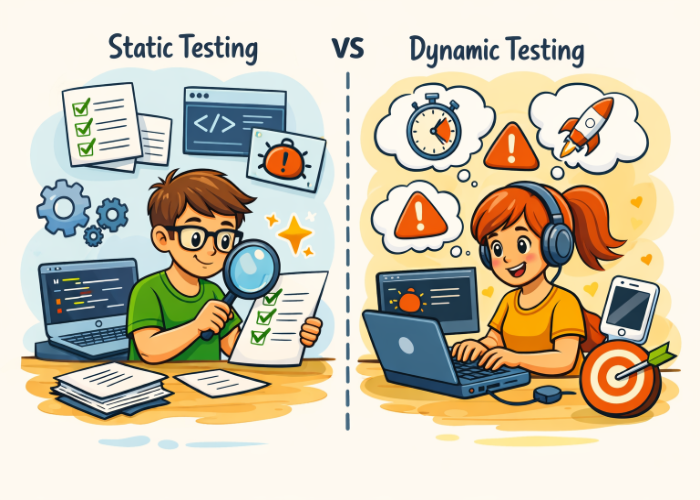
Understanding how static testing and dynamic testing differ is one of the first skills new QA testers develop. These two approaches complement each other: one helps prevent defects before code runs, and the other validates how the software behaves once it’s in motion.
This updated guide explains both methods in simple terms, shows when each is most effective, and highlights how modern QA teams use them together to deliver reliable, high‑quality software.
⭐ Simple Definitions: What Static and Dynamic Testing Really Mean
Static Testing — “Evaluate it before it executes.”
Static testing focuses on analyzing project artifacts—requirements, designs, and source code—without running the application. It’s all about catching issues early, before they turn into costly defects.
Dynamic Testing — “Check it while it runs.”
Dynamic testing examines the software by executing it and observing how it behaves. This is where functional issues, runtime errors, and performance problems surface.
Both methods are essential: static testing prevents early mistakes, while dynamic testing confirms real behavior.
🧩 Why New Testers Should Learn Both Approaches
Modern QA teams rely on a mix of static and dynamic testing because each uncovers different types of defects:
- Static testing exposes requirement gaps, design flaws, and coding issues before development progresses too far.
- Dynamic testing reveals functional, runtime, and performance problems that only appear when the software is running.
Relying on only one approach leaves blind spots in your testing strategy.
🛑 Static Testing Explained Simply
Static testing takes place before the software is executed, usually early in the development cycle.
What You Review
- Requirement documents
- Design specifications
- Architecture diagrams
- Source code
Common Static Testing Techniques
- Reviews — informal checks of documents or code
- Walkthroughs — guided sessions to clarify logic and intent
- Inspections — structured meetings focused on finding defects
- Static code analysis — automated scanning for coding issues
What Static Testing Typically Finds
- Missing or unclear requirements
- Logical design mistakes
- Code style or structure problems
- Early‑stage security concerns
Why Static Testing Is Valuable
- Issues found early are cheaper and easier to fix
- Helps teams avoid building incorrect or incomplete features
- Improves clarity and consistency across documentation and code
🚀 Dynamic Testing Explained Simply
Dynamic testing begins after the software can be executed, whether it’s a small component or a full system.
What You Test
- Functional behavior
- Runtime errors
- Module interactions
- Performance and security characteristics
Common Dynamic Testing Types
- Unit testing
- Integration testing
- System testing
- Acceptance testing
- Performance testing
- Security testing
What Dynamic Testing Typically Finds
- Functional defects
- Crashes or unexpected behavior
- Slow response times
- Integration failures
Why Dynamic Testing Matters
- Confirms the software works as intended
- Validates user flows and real‑world usage
- Ensures the product meets functional and non‑functional expectations
🔍 Static vs. Dynamic Testing: Side‑by‑Side Comparison
| Aspect | Static Testing | Dynamic Testing |
|---|---|---|
| Execution | Evaluates artifacts without running the software | Assesses behavior by executing the application |
| When Used | During requirements, design, and coding stages | After a working build or executable is available |
| Goal | Identify and prevent defects early in the lifecycle | Verify correct functionality and runtime performance |
| Finds | Issues in requirements, design logic, documentation, and code structure | Defects related to functionality, behavior, performance, and integration |
| Techniques | Reviews, walkthroughs, inspections, and static code analysis | Unit, integration, system, acceptance, and performance testing |
| Cost to Fix Defects | Typically low because issues are caught early | Higher due to defects appearing later during execution |
| Automation | Partially automatable through static analysis tools | Highly automatable with modern test frameworks |
🧠 How QA Teams Combine Both Approaches (2025–2026 Practices)
Today’s QA workflows blend static and dynamic testing throughout the development lifecycle.
1. Begin With Static Testing
- Review requirements before development starts
- Use static analysis in early CI stages
- Perform code reviews consistently
2. Transition to Dynamic Testing Once Builds Are Ready
- Run automated unit tests on every commit
- Test integrations and full systems in staging
- Validate performance and security before release
3. Embed Both Into CI/CD Pipelines
Modern pipelines routinely:
- Scan code for issues
- Execute automated tests
- Generate coverage and defect reports
4. Apply Static Testing for Early Security Checks
Static analysis helps identify vulnerabilities before they reach production.
5. Use Dynamic Testing to Validate Real User Behavior
Dynamic tests confirm:
- Authentication flows
- Checkout processes
- API interactions
- Mobile behaviors
🧪 Simple Examples
Static Testing Example
You review a requirement and notice the password rules are missing.
→ The issue is caught before development begins.
Dynamic Testing Example
You test the login form with special characters and the application crashes.
→ The defect appears only during execution.
🎯 When to Use Each Approach
Choose Static Testing When:
- Requirements are being drafted
- Designs are under review
- Code is being written
- You want to prevent defects early
Choose Dynamic Testing When:
- A build is available
- You need to validate functionality
- You’re testing performance or security
- You want to simulate user actions
🏁 Conclusion: Both Methods Make You a Stronger Tester
Static and dynamic testing work best when used together:
- Static testing strengthens quality early.
- Dynamic testing ensures the software behaves correctly in real scenarios.
Mastering both gives new testers a complete toolkit for preventing defects, improving reliability, and supporting smooth releases.




🗨️ Reader Comments