


Automation Anti‑Patterns: Common Pitfalls and How to Avoid Them
Introduction
As a QA software testing engineer, automation is one of the most impactful tools in ensuring product quality and accelerating delivery. It allows us to validate functionality at scale, catch regressions early, and support fast-moving development cycles. However, automation is only effective when it is approached with the right mindset and strategy.
In practice, many QA teams encounter challenges not because automation is inherently flawed, but because of how it is implemented. Poor planning, lack of structure, and short-term thinking can turn automation into a maintenance burden rather than a quality enabler.
In this post, we’ll walk through common automation anti-patterns from a QA perspective, along with practical examples and strategies to avoid them. The goal is to help QA engineers build automation suites that are reliable, maintainable, and aligned with real testing needs.
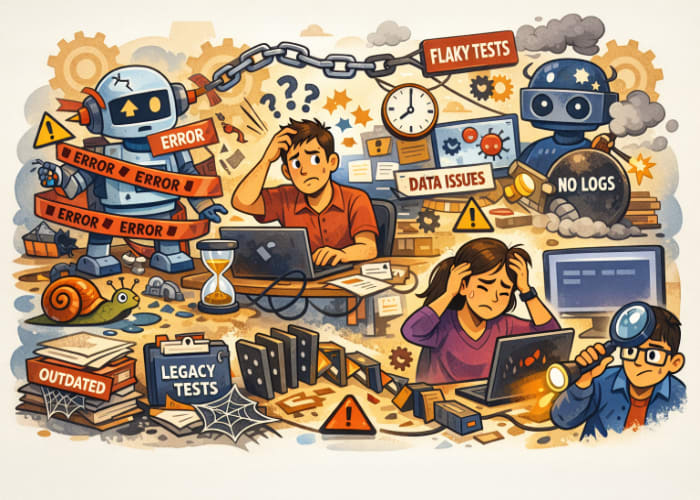
🚫 1. Automating Everything “Just Because You Can”
From a QA standpoint, it’s tempting to automate as many test cases as possible, especially when there is pressure to increase coverage. However, not every test case is a good candidate for automation.
Common QA scenarios:
- Automating unstable UI features that frequently change during sprint cycles
- Writing scripts for exploratory or one-time test scenarios
- Automating low-risk features that rarely impact users
- Covering features that lack clearly defined acceptance criteria
Why it’s a problem:
These tests often fail due to frequent changes rather than actual defects. This creates noise in test results and increases maintenance effort, reducing the overall effectiveness of automation.
A better approach:
As QA engineers, we should prioritize automation based on:
- Risk and business impact
- Frequency of execution (e.g., regression tests)
- Stability of the feature
- Value in catching defects early
For example, automating regression tests for critical user journeys (like login or checkout) provides far more value than automating temporary UI elements.
🚫 2. Treating Automation Like a Side Task
In some teams, QA automation is treated as something to “fit in” after manual testing is complete. This often leads to inconsistent and fragile test suites.
Common QA challenges:
- Test scripts written without standards or structure
- Lack of collaboration between QA team members
- Minimal or no review of automated test cases
- Automation not included in CI/CD pipelines
Why it’s a problem:
When automation is not treated as a core QA responsibility, it becomes disorganized and difficult to scale. This makes onboarding new QA engineers harder and reduces confidence in test results.
A better approach:
Automation should be an integral part of the QA process:
- Maintain test code in version control
- Review automation scripts just like application code
- Follow naming conventions and design patterns (e.g., Page Object Model)
- Integrate automated tests into CI/CD pipelines
- Document test coverage and framework usage
Automation is not separate from testing—it is an extension of it.
🚫 3. Over-Reliance on UI Testing
UI testing is an important part of QA, but relying too heavily on it can create inefficiencies and instability.
From a QA perspective:
- UI tests are slower to execute
- They are more sensitive to layout or styling changes
- They are more likely to produce false failures (flaky tests)
Example:
A UI test validating a multi-step form might fail due to a minor UI change, even though the underlying functionality is working correctly.
A better approach:
QA engineers should adopt a layered testing strategy:
- Unit tests (typically written by developers): validate core logic
- API tests: verify business rules and backend functionality
- UI tests: focus on critical user flows
By collaborating with developers and shifting more validation to API-level tests, QA teams can reduce flakiness and improve execution speed.
🚫 4. Ignoring Test Data Management
Test data plays a critical role in QA automation. Poor data management can lead to inconsistent and unreliable test results.
Common QA issues:
- Using hard-coded test data across multiple test cases
- Tests interfering with each other due to shared data
- Dependency on pre-existing data in the environment
- Test failures caused by outdated or corrupted data
Example:
A test that assumes a specific product exists in the database may fail if that product is removed or modified by another test or team.
A better approach:
QA engineers should implement a clear test data strategy:
- Generate test data dynamically during execution
- Ensure test data isolation between test cases
- Clean up data after tests complete
- Use mock or synthetic data where possible
- Regularly validate test environments
Reliable test data leads to reliable test results.
🚫 5. Lack of Visibility into Test Failures
When automated tests fail, QA engineers need clear and actionable information to investigate the issue quickly.
Common frustrations:
- Generic failure messages
- Missing logs or screenshots
- No clear indication of where or why the test failed
- Difficulty linking failures to requirements or defects
Example:
A failure message like “Assertion failed” without context forces QA engineers to spend extra time reproducing and debugging the issue.
A better approach:
Make your automation framework QA-friendly:
- Capture screenshots for UI failures
- Log detailed execution steps
- Include timestamps and environment details
- Write clear and descriptive assertions
- Integrate with reporting tools (e.g., dashboards, test reports)
Effective automation should help QA engineers diagnose problems efficiently, not slow them down.
🚫 6. Creating Dependent Test Cases
Test dependencies are a major source of instability in QA automation.
Typical QA symptoms:
- Test cases must run in a specific order
- A single failure causes multiple downstream failures
- Parallel execution is limited or impossible
Example:
If one test case creates a user and another test depends on that user, any failure in the first test will invalidate the second.
A better approach:
QA engineers should design test cases to be:
- Independent: No reliance on other tests
- Repeatable: Can run multiple times with consistent results
- Self-contained: Handle their own setup and cleanup
This ensures that failures are isolated and easier to debug.
🚫 7. Neglecting Maintenance of Automation Suites
Automation requires continuous upkeep. From a QA perspective, maintaining test quality is just as important as writing new tests.
Common QA pitfalls:
- Keeping outdated or irrelevant test cases
- Ignoring flaky tests instead of fixing them
- Allowing the test suite to grow without organization
- Failing to review test coverage over time
Example:
A test validating a deprecated feature continues to run in regression suites, wasting execution time and adding noise.
A better approach:
QA teams should establish regular maintenance practices:
- Review and refactor test cases periodically
- Remove obsolete or redundant tests
- Investigate and fix flaky tests promptly
- Reassess test coverage based on product changes
A clean and well-maintained test suite improves both efficiency and confidence in results.
🎯 Final Thoughts
From a QA software testing perspective, automation is not just about increasing test coverage—it’s about improving the quality and reliability of the product.
Avoiding these anti-patterns helps QA teams build automation that is:
- Reliable and stable
- Easy to maintain
- Aligned with real testing goals
- Valuable to the overall development process
By approaching automation with discipline and clear intent, QA teams can design frameworks that are reliable, maintainable, and deliver measurable value to current testing needs while remaining scalable for future growth. This disciplined foundation accelerates release cycles, enhances product quality, and empowers teams to test with confidence and clarity to truly support high-quality software delivery.




🗨️ Reader Comments