


How to Improve Test Coverage Without Increasing Workload

Improving test coverage is one of the most common goals in QA and DevOps teams. But the moment someone says “we need more coverage,” testers often worry that it means more test cases, more automation, more manual work, and more pressure.
The good news:
You can increase test coverage without increasing workload—if you approach coverage strategically instead of numerically.
This post breaks down practical, modern techniques that help teams expand coverage while keeping effort flat (or even reducing it).
🧭 1. Shift From “More Tests” to “Better Tests”
Most teams try to increase coverage by adding more test cases.
This is the fastest way to increase workload and the slowest way to increase quality.
Instead, focus on coverage efficiency:
- One well‑designed test can cover multiple branches or scenarios.
- A single API test can validate logic that would require 10+ UI tests.
- A parameterized test can replace dozens of individual cases.
Key mindset:
Coverage is not about quantity — it’s about reach.
🔍 2. Use Risk‑Based Prioritization to Expand Coverage Where It Matters
Risk‑based testing is one of the most effective ways to increase meaningful coverage without adding work.
How it reduces workload:
You stop testing everything equally and instead focus on:
- High‑impact features
- High‑usage workflows
- Areas with frequent defects
- Complex logic with many branches
- Integrations with external systems
This allows you to increase coverage in critical areas while reducing effort spent on low‑value scenarios.
Practical steps:
- Tag tests by risk level (High, Medium, Low).
- Increase coverage only for High‑risk areas.
- Reduce or eliminate Low‑risk test cases.
- Use automation only where risk and stability justify it.
🧩 3. Replace Redundant Tests With Parameterized or Data‑Driven Tests
Redundant tests quietly inflate workload.
Example:
Ten tests that validate the same workflow with different inputs.
Replace them with:
- Parameterized tests (unit level)
- Data‑driven tests (API or UI level)
This reduces:
- Test creation time
- Test maintenance
- Test execution time
And increases:
- Input coverage
- Branch coverage
- Scenario coverage
Result:
More coverage, less work.
⚙️ 4. Shift Coverage Down the Testing Pyramid
UI tests are expensive.
API and unit tests are cheap.
If your coverage is UI‑heavy, you’re working harder than you need to.
Move coverage downward:
- Convert UI tests → API tests where possible
- Convert API tests → unit tests where possible
- Add contract tests to cover integration logic without UI overhead
Why this works:
- Unit tests run in milliseconds
- API tests run in seconds
- UI tests run in minutes
Shifting coverage downward gives you more coverage per hour than any other strategy.
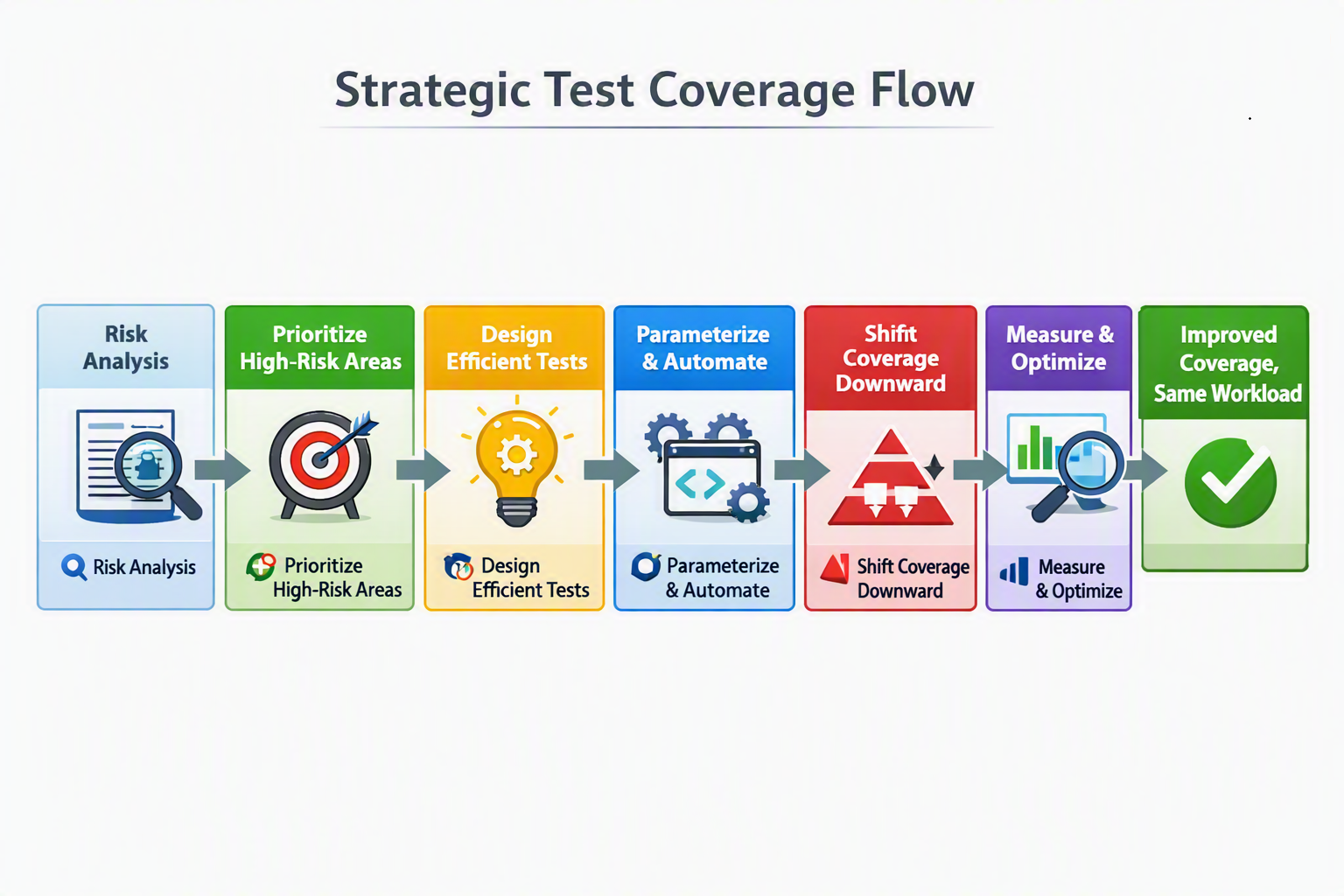
🧩 Diagram: Strategic Test Coverage Flow
To help visualize how each part of the testing process contributes to better coverage without adding extra work, the following flow illustrates the key stages involved in building a smarter, more efficient strategy.
🧪 5. Use Mutation Testing to Identify Coverage Gaps Automatically
Mutation testing tools (like PIT, Stryker, or MutPy) reveal where your tests look like they provide coverage but actually don’t.
Mutation testing helps you:
- Identify weak tests
- Strengthen existing tests
- Improve coverage without adding new test cases
- Increase confidence in critical logic
This is one of the most efficient ways to improve coverage without increasing workload because it focuses your effort only where it’s needed.
🔄 6. Automate Test Data Creation and Cleanup
A huge portion of testing workload comes from test data management, not test writing.
By automating:
- Data setup
- Data teardown
- Synthetic data generation
- Environment resets
You free up time that can be reinvested into improving coverage.
Tools & approaches:
- Factory methods
- API‑based data creation
- Database fixtures
- Dockerized test environments
- Synthetic data generators
When data is easy, coverage becomes easy.
🧠 7. Use Code Coverage Reports to Remove Low‑Value Tests
Improving coverage isn’t only about adding tests — it’s also about removing tests that don’t help.
Coverage reports help you identify:
- Duplicate tests
- Tests covering trivial logic
- Tests covering dead code
- Tests that no longer match the product
- Tests that add maintenance cost but no value
Removing low‑value tests reduces workload and frees time to improve coverage where it matters.
🤖 8. Leverage AI‑Assisted Test Generation (Carefully)
Modern AI tools can generate:
- Unit test skeletons
- API test scenarios
- Edge‑case inputs
- Boundary conditions
- Negative test cases
This accelerates coverage expansion without increasing workload — as long as humans still review and refine the output.
AI is best used for:
- Repetitive test creation
- Boundary value analysis
- Data generation
- Initial drafts of test suites
It is not a replacement for human judgment.
📈 9. Focus on Coverage Quality, Not Coverage
Coverage percentages are misleading.
A jump from 70% → 80% might add no real value.
A jump from 70% → 71% might eliminate a critical blind spot.
Instead of chasing numbers, chase impact:
- Cover complex logic
- Cover integrations
- Cover error handling
- Cover edge cases
- Cover business‑critical workflows
This approach increases meaningful coverage without increasing workload.
✅ Coverage Improvement Checklist
Before wrapping up, here’s a practical checklist you can use to systematically improve test coverage while keeping your workload steady.
                                       ▢ Identify high‑risk features and workflows
                                       ▢ Eliminate redundant or low‑value tests
                                       ▢ Convert repetitive tests to parameterized ones
                                       ▢ Shift UI tests to API or unit level
                                       ▢ Automate test data setup and cleanup
                                       ▢ Use mutation testing to find weak spots
                                       ▢ Review coverage reports for dead code
                                       ▢ Apply AI tools for boundary and edge cases
                                       ▢ Focus on meaningful coverage, not percentages
                                       ▢ Reassess coverage quarterly for efficiency gains
🧭 Final Thoughts
Improving test coverage doesn’t require more work — it requires smarter work.
By shifting coverage downward, eliminating redundancy, automating data, and focusing on risk, teams can dramatically increase coverage while keeping workload flat or even reducing it.
The goal isn’t to test more.
The goal is to test better.





🗨️ Reader Comments