


Understanding CI/CD for Testers: Key Concepts Explained Clearly
Understanding CI/CD for Testers
Continuous Integration and Continuous Delivery/Deployment (CI/CD) has become a core part of modern software development — and testers are right in the middle of it. If you’re a beginner or intermediate QA tester stepping into DevOps, this guide will help you understand what CI/CD really means, why it matters, and how your role fits into the pipeline.
This post is written for new QA testers, especially those transitioning into DevOps or working with automated pipelines for the first time.
As teams move faster and release more frequently, traditional testing approaches struggle to keep up. CI/CD solves this by automating the build, test, and deployment process so teams can deliver high‑quality software continuously.
But here’s the truth many testers don’t hear early enough:
CI/CD is not just for developers — testers play a critical role in making pipelines reliable, stable, and trustworthy.
Understanding how CI/CD works helps you design better tests, catch issues earlier, and collaborate more effectively with developers and DevOps engineers.
Let’s break it down in a clear, tester‑friendly way.
What Is CI/CD?
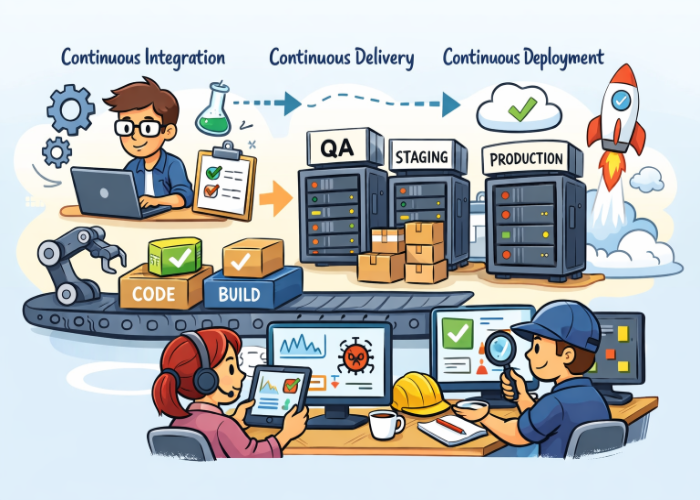
CI/CD is a set of practices that automate how software is built, tested, and delivered. It has three main components:
1. Continuous Integration (CI)
Developers frequently merge code changes into a shared repository. Each merge triggers:
- A new build
- Automated tests
- Static analysis or linting
- Quality checks
The goal: catch issues early, before they pile up.
2. Continuous Delivery (CD)
Once CI passes, the application is packaged and prepared for release.
Deployments to environments like QA, staging, or UAT are automated but still require manual approval.
The goal: make releases predictable and low‑risk.
3. Continuous Deployment (also CD)
Every successful pipeline run automatically deploys to production — no manual approval.
The goal: fully automated, fast, repeatable releases.
Why CI/CD Matters for Testers
CI/CD changes how testing works — for the better. Here’s what it means for you:
- Testing happens earlier (shift‑left)
- Automation becomes essential, not optional
- Feedback loops are faster
- You collaborate more closely with developers and DevOps
- Quality gates ensure standards are met before code moves forward
Instead of waiting for a “testing phase,” you’re part of a continuous quality process.
Key CI/CD Concepts Testers Should Understand
1. Pipelines
A pipeline is a series of automated steps that run every time code changes.
Common stages include:
- Build
- Unit tests
- Integration tests
- UI or end‑to‑end tests
- Security scans
- Deployment
As a tester, you’ll often help define:
- Which tests run in each stage
- What counts as a pass/fail
- What blocks a deployment
2. Quality Gates
Quality gates are rules that code must meet before moving to the next stage.
Examples:
- 95% of tests must pass
- No critical security vulnerabilities
- Code coverage must be above 80%
- No failing unit tests
Testers help design and enforce these gates.
3. Automated Testing in CI/CD
Automation is the backbone of CI/CD. Common types of automated tests include:
- Unit tests — run fast, catch logic errors
- API tests — validate backend functionality
- UI tests — simulate user interactions
- Integration tests — ensure components work together
- Smoke tests — quick checks after deployment
Testers decide:
- Which tests belong where
- How to prioritize test execution
- How to reduce flaky tests
4. Environments
CI/CD pipelines deploy to multiple environments:
- Dev — for developers
- QA/Test — for testers
- Staging/UAT — for business validation
- Production — for end users
Understanding environment differences helps you design more reliable tests.
5. Artifacts
Artifacts are the packaged outputs of the build process — for example:
- Compiled code
- Docker images
- Test reports
- Logs
Testers often review artifacts to:
- Validate builds
- Troubleshoot failures
- Confirm test results
6. Triggers
Triggers determine when a pipeline runs. Examples:
- Code push
- Pull request
- Scheduled nightly run
- Manual trigger
Knowing triggers helps testers plan test coverage and timing.
7. Deployment Strategies
Modern pipelines use deployment strategies to reduce risk:
- Blue‑Green Deployment — switch traffic between two environments
- Canary Releases — release to a small % of users first
- Rolling Deployments — update servers gradually
Testers validate these strategies by:
- Running smoke tests
- Monitoring logs
- Checking rollback behavior
What Testers Actually Do in CI/CD
Here’s what your day‑to‑day involvement may look like:
1. Designing automated test suites
You decide:
- Which tests run on every commit
- Which tests run nightly
- Which tests run before production
2. Reviewing pipeline failures
You help diagnose:
- Test failures
- Environment issues
- Flaky tests
- Build errors
3. Improving test reliability
You work with developers to:
- Fix unstable tests
- Reduce execution time
- Improve coverage
4. Collaborating on quality gates
You help define:
- Pass/fail criteria
- Coverage thresholds
- Security requirements
5. Validating deployments
You run:
- Smoke tests
- Exploratory tests
- Regression tests
6. Monitoring quality trends
You track:
- Failure patterns
- Slow pipelines
- Repeated defects
Best Practices for Testers in CI/CD
- Automate early and often
- Keep tests fast — slow pipelines slow down the whole team
- Avoid flaky tests — they erode trust in the pipeline
- Use test data management to keep environments consistent
- Collaborate with DevOps — you’re part of the same workflow
- Review pipeline logs to understand failures
- Shift left — test as early as possible
Conclusion
CI/CD isn’t just a DevOps or developer responsibility — it’s a quality practice, and testers are essential to making it work. By understanding pipelines, automation, quality gates, and deployment strategies, you can help your team deliver faster, safer, and more reliably.
As a QA tester, your role in CI/CD is to ensure that quality is built into every stage of the pipeline — not just tested at the end.
Here’s your expanded FAQ section with two new questions added — it now reads smoothly and gives testers a fuller understanding of CI/CD in practice.
FAQ
1. Do testers need to know how to write code for CI/CD?
Not always — but having a basic understanding of scripting languages (like Python, PowerShell, or Bash) and automation frameworks (such as Selenium or Playwright) can make a huge difference. It helps you read pipeline logs, debug test failures, and collaborate more effectively with developers. Even simple scripting skills let you automate repetitive tasks and contribute directly to pipeline improvements.
2. What tools are commonly used for CI/CD?
Popular CI/CD tools include Azure DevOps, GitHub Actions, Jenkins, GitLab CI, and CircleCI. Each tool automates builds, tests, and deployments but differs in setup and integration options. For example, Azure DevOps integrates tightly with Microsoft ecosystems, while GitHub Actions is ideal for open‑source projects. Testers should focus on understanding how these tools trigger tests, manage environments, and report results — not necessarily mastering every configuration detail.
3. What tests should run in CI?
CI focuses on speed and reliability, so it’s best for tests that run quickly and provide immediate feedback. These include:
- Unit tests to verify individual components
- API tests to confirm backend logic
- Smoke tests to ensure basic functionality
- Integration tests for critical workflows
The goal is to catch defects early without slowing down the pipeline. Tests that take longer or require complex setups are usually reserved for later stages.
4. What tests should run in CD?
CD pipelines handle broader, deeper testing before release. This includes:
- Regression tests to confirm existing features still work
- UI tests to validate user experience
- Performance tests to check speed and scalability
- Security scans to detect vulnerabilities
These tests ensure the product is stable and production‑ready. Testers often collaborate with DevOps engineers to schedule these runs and analyze results before deployment approval.
5. How do testers help prevent flaky tests?
Flaky tests — those that pass or fail inconsistently — undermine trust in automation. Testers prevent them by:
- Designing tests with clear, stable conditions
- Using reliable test data and environment setups
- Reviewing logs and screenshots to pinpoint instability
- Collaborating with developers to fix timing or dependency issues
A consistent test environment and well‑structured test cases are key to maintaining pipeline confidence.
6. Is CI/CD only for automated testing?
Not at all. While automation drives CI/CD efficiency, manual testing still matters — especially for exploratory, usability, and acceptance testing. Manual testers validate real‑world scenarios that automation can’t fully capture. In mature CI/CD setups, manual testing often happens after automated checks pass, ensuring both speed and human insight contribute to overall quality.
7. How is test data managed in CI/CD pipelines?
Test data management is crucial for reliable automation. Testers often use data provisioning tools or mock services to ensure consistent inputs across environments. Good practices include:
- Using versioned test data sets
- Masking sensitive information
- Resetting data between runs
- Automating data cleanup after tests
Proper test data management prevents false failures and keeps pipelines reproducible.
8. What should testers do when a pipeline fails?
When a pipeline fails, testers act as investigators. They review logs, screenshots, and error messages to identify whether the issue is:
- A genuine defect
- A flaky test
- An environment or configuration problem
Testers document findings, communicate with developers, and help refine pipeline stability. Over time, this collaboration improves both test reliability and deployment confidence.


🗨️ Reader Comments